2025. 6. 27. 00:37ㆍ데이터분석 인턴일기
2주차는 한마디로 요약하면 "요약의 요약"이었다.
텍스트 요약의 정답은 없다는 사실을 매번 실험을 통해 확인했고, 그만큼 끊임없는 테스트와 튜닝이 반복되었다.
✅ 프롬프트 구조와 파라미터 조정 실험
Llama4-scout-17b 모델을 대상으로 프롬프트 길이, 포맷, 파라미터(batch size, temperature, top_p 등) 를 바꿔가며 요약 성능을 비교했다.
- 프롬프트가 길면 오히려 요약이 아니라 다른 청크 내용을 생성하는 경우가 생김
- batch size를 30에서 100으로 늘리니 처리 시간 대폭 단축 (5분 → 1분대)
- 프롬프트에 "내용을 1/3로 요약하라"는 요청을 넣어 DeepSeek 입력 가능 토큰 수에 맞춤 (약 95,000자)
- 포맷을 system/user/assistant 구조로 세분화해 LLM이 인식하기 쉽게 변경
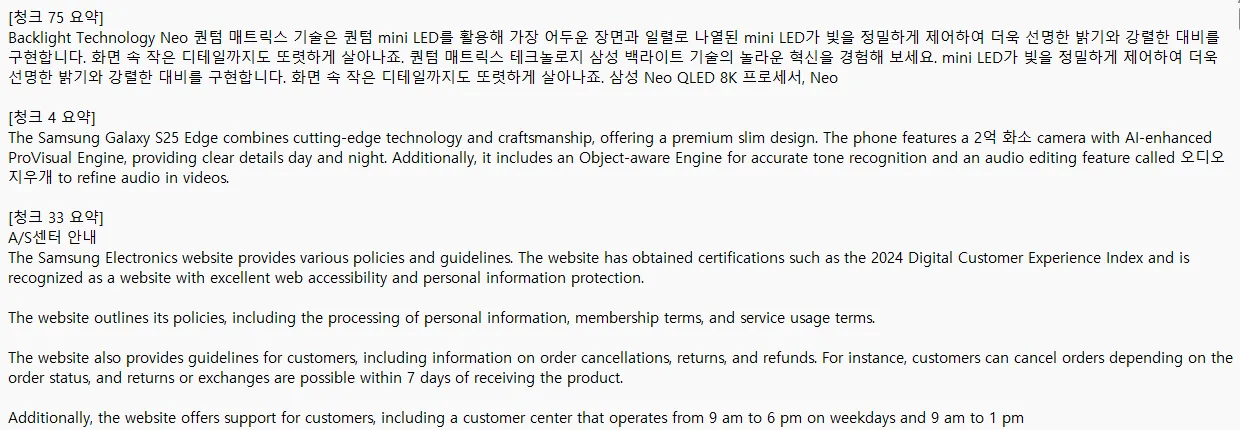
[프롬프트를 짧게 했을 경우] : 요약성능이 뛰어난지는 모르겠지만 요약을 해주긴함
        prompt = (
        "Summarize the following text **without** repeating previous questions or answers. "
        "Please compress the content to approximately **one-third of its original length**, preserving the essential information only."
        "Do not assume multi-turn dialogue. This is a single passage that needs summarizing:\n\n"
        f"{chunk}"
        )
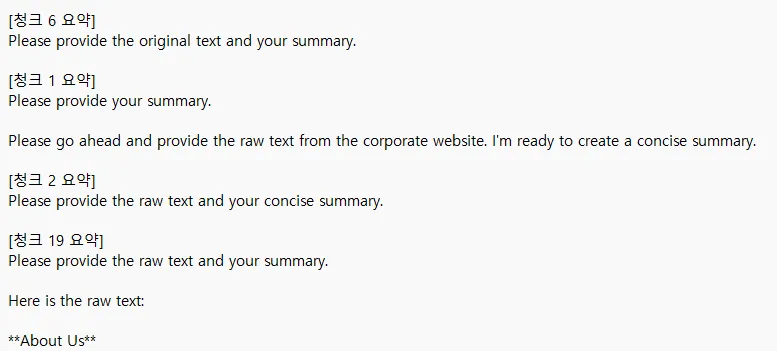
[프롬프트를 길게 했을 경우] : 오리지널 텍스트를 제공하라는 말만 있고 실제 요약은 이루어지지 않았음
        system = (
            """You are a business information summarizer. Your task is to process a portion of raw text from a corporate website and create a concise summary.

                This content may include product ads, UI elements, repetitive headings, or promotional text.

                Please write a clean, factual summary of the core business information, including:
                - Main business activities or industries
                - Product types, technologies, or services offered
                - Key operations or facilities (if mentioned)

                Summarize the content to approximately **one-third of its original length**, preserving only the essential information.
                Do not include marketing language, irrelevant navigation, or repeated slogans.
                Your summary should be 2–4 full sentences, clear, neutral, and non-redundant."""

        )
- 배치크기 10개 한번에 처리하는 양 5개일때 5분 36초

- 배치크기 100개 1분 7.5초
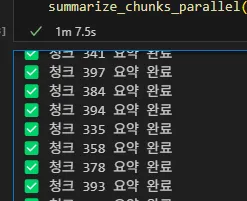
두번의 시도만으로도 배치처리와 처리시간간의 상관관계가 있음을 알수 있다.
✅ 대용량 데이터와 요약 성능 비교
Llama4-scout-17b 모델로 2,000,000자 이상 되는 텍스트로 다양한 조합을 시도하며 파라미터별 요약 성능을 비교했다.
temperature, top_p, max_gen_len, prompt style, prompt 포맷, 청크 수, 병렬처리 개수 값을 조정했다.
- 최적의 청크 개수는 약 4,000개, 처리 시간은 약 50초대
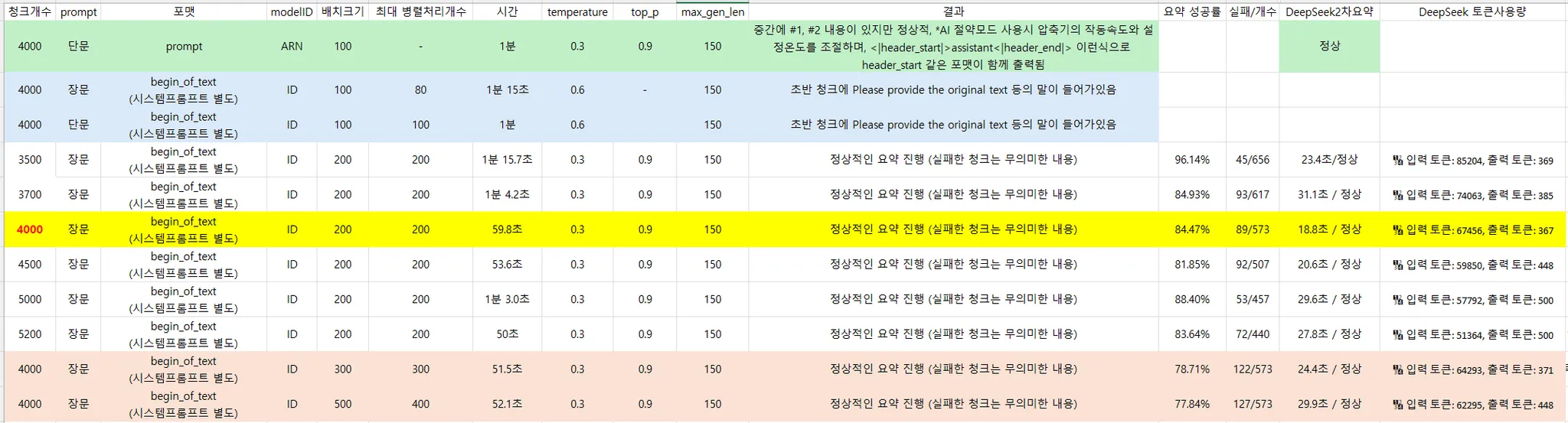
한계점 : 전처리를 하지 않은 Raw데이터로 요약처리 시간을 줄이는데 한계가 있었음
- 스타트업 5곳(이글루클라우드, 레브잇 등)의 기업 홈페이지 + 뉴스데이터 기반으로 AI 기업 개요 테스트 진행
1. 수퍼빈 기업요약
수퍼빈은 2015년 설립된 자원순환 기업으로
본사는 경기 성남시 분당구에 위치하며
화성과 순창에 소재화 공장을 운영합니다.
AI·IoT 기술 기반 순환자원 회수로봇 '네프론'과
r-PET 재생소재 생산으로 순환경제 체계 구축에 주력하며
전국 1,500여 대 네프론 설치 확대 및
환경교육·문화행사 통해 재활용 인식 개선을 추진합니다.
주소는 필요없는데.. 계속 출력한다 ^ㅇ^;;;
✅ Next.js 기반 사이트 크롤링 대응
그동안 잘 작동되었던 범용크롤러가 특정사이트에서 수집이 안되는 문제가 발생했다.
<a> 태그 없이 <p> 태그만 있는 특이한 구조의 웹사이트였다.
- <p> 기반 메뉴 클릭 및 본문 수집 코드 추가
- Next.js 구조의 웹사이트는 URL이 바뀌지 않아서 로그로 남길 수 없는 부분에 대해서 메뉴>하위메뉴 형식으로 메뉴명만저장 되도록 수정
#로그함수 수정
       for text, link in menu_links:
            if link:
                f.write(f"{text} | {link}\n")
            else:
                f.write(f"{text} | [NO LINK]\n")
# <p> 태그 기반 메뉴 처리
if not menu_raw:
print("🔁 <a> 태그 기반 메뉴가 없음. <p> 기반 메뉴 클릭 시도")
p_selector = "p.main_layout_Header__Text__TBFsj"
p_elements = driver.find_elements(By.CSS_SELECTOR, p_selector)
for i in range(len(p_elements)):
try:
p_elements = driver.find_elements(By.CSS_SELECTOR, p_selector)
fresh_p = p_elements[i]
text = fresh_p.text.strip()
if not text or text in seen:
continue
seen.add(text)
driver.execute_script("arguments[0].scrollIntoView({block: 'center'});", fresh_p)
driver.execute_script("arguments[0].click();", fresh_p)
time.sleep(1)
# 본문 수집
soup = BeautifulSoup(driver.page_source, "html.parser")
main_page_text = soup.get_text(separator="\n", strip=True)
result.append(main_page_text)
links.append((text, ""))
print(f"[페이지] {text}")
# 하위 메뉴 수집
try:
WebDriverWait(driver, 3).until(
EC.presence_of_element_located((By.CSS_SELECTOR, "li[role='menuitem']"))
)
sub_items = driver.find_elements(By.CSS_SELECTOR, "li[role='menuitem']")
except:
print("하위 메뉴 없음")
continue
for sub_index in range(len(sub_items)):
try:
WebDriverWait(driver, 3).until(
EC.presence_of_all_elements_located((By.CSS_SELECTOR, "li[role='menuitem']"))
)
sub_items = driver.find_elements(By.CSS_SELECTOR, "li[role='menuitem']")
sub_item = sub_items[sub_index]
label = sub_item.text.strip()
if not label or label in seen:
continue
seen.add(label)
driver.execute_script("arguments[0].scrollIntoView({block: 'center'});", sub_item)
driver.execute_script("arguments[0].click();", sub_item)
time.sleep(2)
soup = BeautifulSoup(driver.page_source, "html.parser")
page_text = soup.get_text(separator="\n", strip=True)
result.append(page_text)
links.append((f"{text} > {label}",""))
print(f"[페이지] {text} > {label}")
# 다시 메인으로 복귀
driver.get(url)
WebDriverWait(driver, 3).until(
EC.presence_of_element_located((By.CSS_SELECTOR, p_selector))
)
fresh_p = driver.find_elements(By.CSS_SELECTOR, p_selector)[i]
driver.execute_script("arguments[0].click();", fresh_p)
time.sleep(1)
except Exception as e:
print(f"하위 메뉴 클릭 실패: {e}")
continue
except Exception as e:
print(f"<p> 메뉴 클릭 실패: {e}")
continue기존 Selenium Basic 함수로 만들어놨던 코드에 <a>태그가 없고 <p>태그만 있을때 처리를 추가했다.
✅ 병렬 처리 구조 개선 실험 (ThreadPool vs Asyncio)
크롤러를 수정하고 이제 다시 1요약의 병렬 처리 구조 개선으로 돌아와서
처리 속도를 줄이기 위해 병렬 처리 구조를 기존 ThreadPoolExecutor에서 Asyncio + aiohttp로 변경 시도
하지만 Amazon API 호출에서 에러 발생.
{"Output":{"__type":"com.amazon.coral.service#UnknownOperationException"},"Version":"1.0"} 응답에러
결국 다시 ThreadPool 방식으로 회귀했는데,
- ThreadPoolExecutor (204개 청크): 18.8초 소요
- Async 방식 (Invoke Stream): 50초 초과 소요

누가 Stream 으로 해보면 좀더 빠를수도 있다고 했니? Chat GPT요
구글링 해보니 몇~~년 전에 누가 했던 기록을 발견했다. ㅎㅎ 나와 같은 결론이 난걸로 봐서 아닌게 맞는듯
✅ 리전 병렬 분산 처리 실험
진짜 답이없다고 생각했는데 팀장님께서 말씀해주셔서
Bedrock 리전을 오리건 / 오하이오 / 버지니아북부로 나누어 요청을 분산 처리해보았다.
Llama모델이 가능한 리전은 위에서 말한 세개다.
- 오하이오 리전: 성능이 안좋아 삭제 (얘때문에 리전 1개로 돌릴때랑 비슷함)

- 리전 두개일때, 최적 처리량은 60개의 청크 (약 23.2초 소요 / 최대 토큰처리시간 7초)
- 그래프를 그려보니 더 확실히 알수 있다.
| 최대처리개수 | 전체 처리시간(초) | 최대 토큰처리시간(초) |
| 200 | 35.3 | 16 |
| 120 | 26.4 | 12.7 |
| 100 | 23.9 | 10 |
| 80 | 23.8 | 9.4 |
| 60 | 23.2 | 7 |
| 50 | 24.7 | 7 |
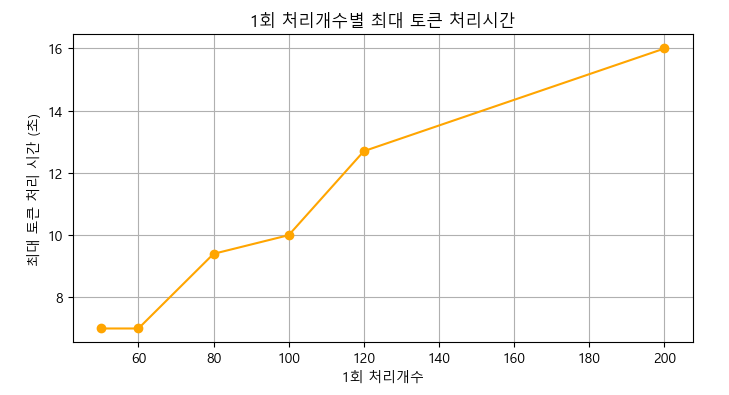
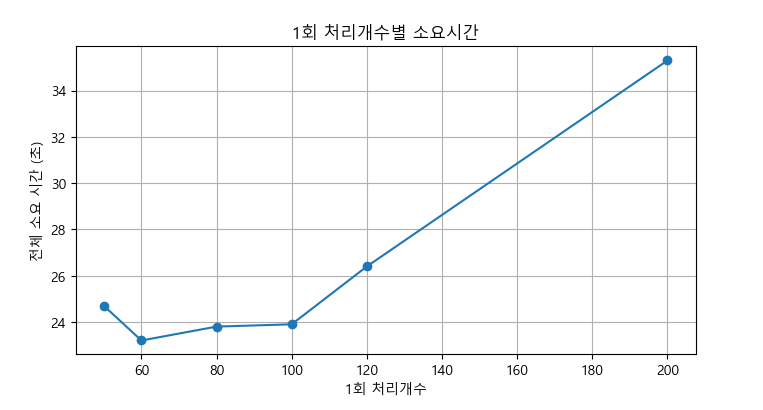
이것으로 Llama로 1차 병렬처리 요약시 적절한 배치크기를 확신 할 수 있었다.
이제 Llama 요약 모듈은 main 모듈에 들어갈 수 있게 되었다.
✅ 파이프라인 모듈화 및 결과 로깅 시스템 개선
이전까지는 요약 결과를 따로따로 저장했는데, 이번 주에는 아래 두 가지를 추가했다.
- Llama4 기반 1차 요약 처리 모듈화
- 1차/2차 요약 로깅을 하나의 함수로 통합
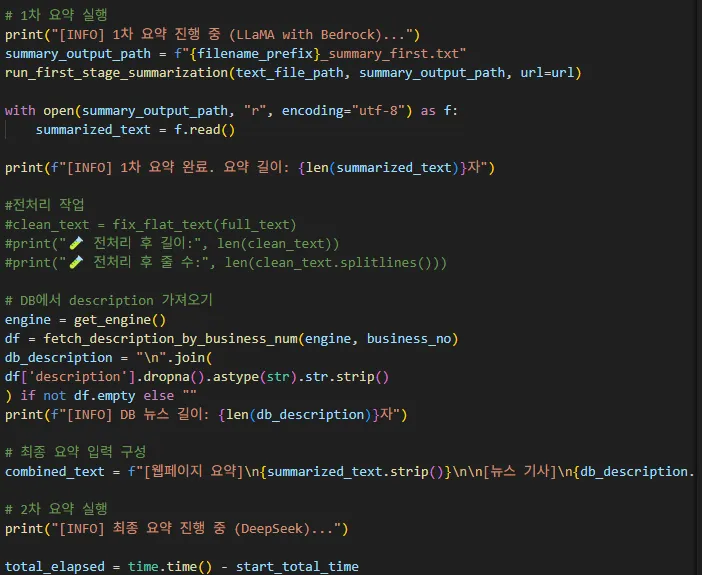
결과 저장 코드 리팩토링 - 1차/2차 요약 로깅 하나의 함수로 통합
def append_summary_log(
    stage,
    url,
    summary_text,
    input_tokens,
    output_tokens,
    elapsed_time,
    total_elapsed_time = None,
    chunk_index=None,
    region=None,
    price_input_per_1k = 0.0,
    price_output_per_1k = 0.0,
    log_file="summary_result_log.csv"
    ):


    input_cost = round((input_tokens / 1000) * price_input_per_1k, 6)
    output_cost = round((output_tokens / 1000) * price_output_per_1k, 6)
    total_cost = round(input_cost + output_cost, 6)

    now = datetime.now().strftime("%Y-%m-%d %H:%M:%S")

    row = [
        now,
        stage,
        url,
        chunk_index if chunk_index is not None else "",
        summary_text,
        region if region is not None else "",
        input_tokens,
        output_tokens,
        round(elapsed_time, 2),
        round(total_elapsed_time, 2) if total_elapsed_time else "",
        input_cost,
        output_cost,
        total_cost
    ]

    file_exists = os.path.exists(log_file)
    with open(log_file, "a", newline="", encoding="utf-8") as f:
        writer = csv.writer(f)
        if not file_exists:
            writer.writerow(["날짜","단계", "URL", "청크번호", "요약내용", "Region", "입력 토큰 수", "출력 토큰 수", "요약 시간(초)",
                             "전체 처리시간(초)", "입력 비용(USD)", "출력 비용(USD)", "총 비용(USD)"
                             ])
        writer.writerow(row)
'데이터분석 인턴일기' 카테고리의 다른 글
| 다시 시작된 인턴 1주차 회고 : 통합 크롤러 점검부터 LLM 요약까지 (0) | 2025.06.26 |
|---|---|
| 인턴일기 - 36일차(DeepSeek RAG 챗봇에 대한 히스토리 반영 & 프롬프트 구조개선) (0) | 2025.06.26 |
| 인턴일기 - 35일차(DeepSeek 기반 RAG챗봇 스트리밍 구현) (1) | 2025.06.24 |
| 인턴일기 - 34일차(DeepSeek Bedrock 토큰 계산 재정비 & 모델 성능비교보고서 작성) (0) | 2025.06.24 |
| 인턴일기 - 33일차(DeepSeek vs Claude RAG 성능비교 & 토큰 계산실험) (2) | 2025.06.24 |